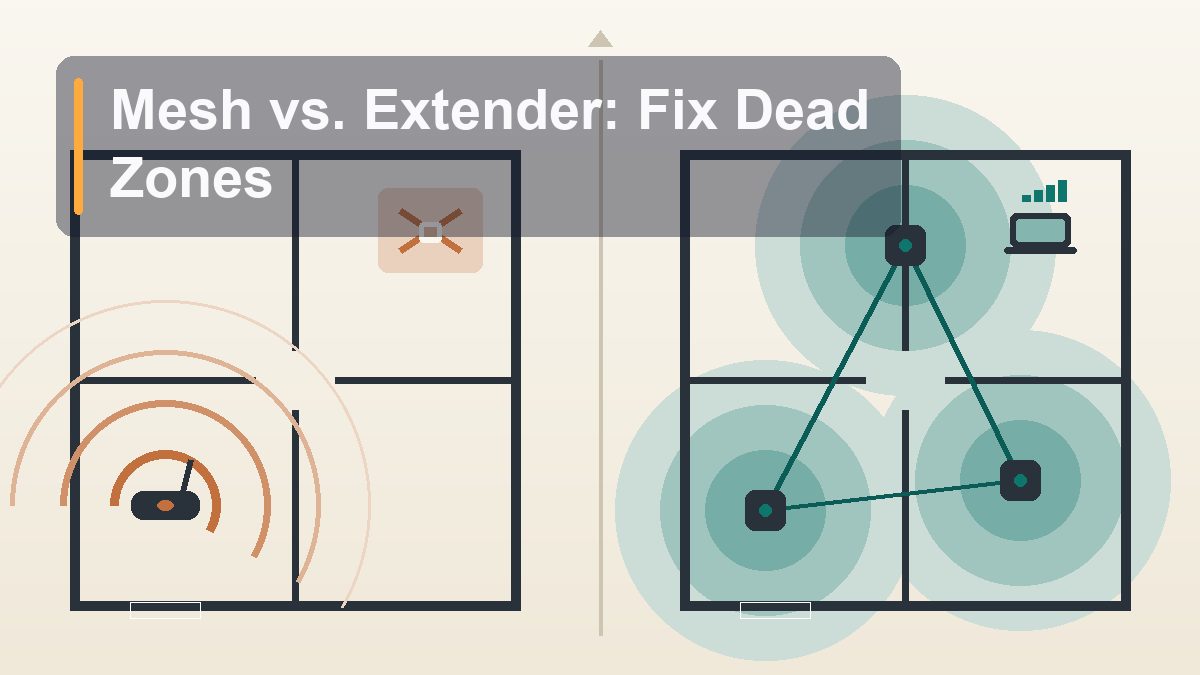
Mesh Wi-Fi vs. Range Extender: What Actually Fixes Dead Zones
The back bedroom where video calls freeze and the garage where the smart doorbell goes offline aren’t bad luck — they’re physics. But the fix you pick matters enormously, because one popular option quietly halves your speed while another makes the problem disappear entirely. Here’s how to tell them apart before you spend anything.
There’s a room in almost every house where Wi-Fi goes to die. You know yours. Maybe it’s the upstairs office where the router’s signal has to fight through two floors and a furnace duct, and your work calls pixelate every afternoon like clockwork. Maybe it’s the far end of a ranch house, ninety feet and five drywall partitions from the closet where the internet enters the building. A reader in Columbus, Ohio wrote in last month describing the classic ritual: standing in the kitchen with one bar, walking toward the living room watching it climb to three, then losing it completely in the back bedroom she’d converted into a craft room. She’d already bought one of those plug-in extenders from a big-box store. It helped for a week, then everything got weird — slow speeds, devices that wouldn’t roam, a second network name nobody could remember. Her question was the right one: should she have bought mesh instead? The answer is “it depends,” but it depends on knowable things — your square footage, your walls, your wiring, and how much speed you’re willing to sacrifice. This guide walks through why dead zones happen, how each fix actually works under the hood, and a simple decision framework that matches the fix to the house.
Why Dead Zones Happen in the First Place
It’s not your router being cheap — it’s physics being consistent
Wi-Fi is radio, and radio obeys rules that don’t care what you paid for your router. Three forces conspire to create dead zones, and understanding them tells you which fix will actually work.
Distance is the obvious one. A Wi-Fi signal weakens with the square of the distance — double the range and you get a quarter of the power. The 5 GHz band most devices prefer for speed fades even faster than the longer-reaching 2.4 GHz band, which is why your phone sometimes shows full bars but crawls, or flips to the slower band at the far end of the house. A router that blankets a 1,200-square-foot apartment can leave a 2,800-square-foot two-story with genuine holes, no matter how many antennas stick out of it.
Walls are the sneaky one. Drywall knocks a signal down a little. But the villains of home Wi-Fi are denser: brick and stone exteriors, plaster over metal lath (common in pre-1950s homes), concrete basement walls, foil-backed insulation, mirrors, and — the champion — anything containing water or metal. A refrigerator, a filing cabinet, a radiant floor heating system, even a large aquarium will gut a 5 GHz signal. This is why the dead zone is so often one specific room: it’s not farther, it’s shielded.
Interference is the invisible one. Your 2.4 GHz signal shares its frequencies with microwave ovens, baby monitors, cordless phones, Bluetooth gadgets, and every neighbor’s router within earshot. In a dense suburb or apartment building, the airwaves are a cocktail party where everyone’s shouting. Interference doesn’t always kill the signal — it degrades it, producing the maddening “connected but nothing loads” state that makes people restart routers out of pure ritual.
One more root cause deserves its own sentence because it fixes so many dead zones for free: placement. Routers get shoved into basements, closets, and corners because that’s where the cable enters the house — the three worst possible spots. A router wants to be central, elevated, and out in the open. Before you buy anything, try moving yours. We’ll come back to that.
How Range Extenders Work — and Their Built-In Problem
The $30 fix with a hidden 50% tax
A range extender (also sold as a repeater or booster) is a small box that plugs into an outlet somewhere between your router and the dead zone. It listens for your router’s Wi-Fi, then rebroadcasts it under either the same name or a new one like “MyNetwork_EXT.” Your phone in the back bedroom connects to the extender instead of the faraway router, and the extender shuttles the traffic back and forth. Simple concept, genuinely cheap, and sometimes exactly the right tool.
But there’s a structural catch baked into how most extenders work, and it’s the reason so many people buy one and end up disappointed. A basic single-band or dual-band extender uses the same radio to talk to your router and to talk to your phone. It can’t do both at once. Every byte of data makes the trip twice over the same channel — router to extender, then extender to phone — which cuts your effective throughput roughly in half. If you get 300 Mbps near the router, the room behind the extender might see 120–150 Mbps on a good day. For email and streaming, fine. For a gamer or a household of simultaneous video calls, it feels like a downgrade.
There are three more wrinkles worth knowing before you buy one:
- Placement is unforgiving. An extender has to sit where it still gets a strong signal from the router — typically halfway to the dead zone, not in it. Plug it into the dead room itself and it just faithfully repeats a terrible signal. The little LED signal meters on the box exist precisely because everyone gets this wrong.
- The roaming problem. Cheaper extenders create a separate network name, so your phone clings to the weak router signal until it dies completely, then you manually switch. Newer extenders that mirror your network name handle this better, but handoffs are still clumsier than mesh.
- One room, not one house. An extender patches a single problem area. Two dead zones means two extenders, two more things to configure, and compounding speed loss if one ever chains through another (never do this).
So when is an extender the right answer? When the problem is small and specific: one bedroom, one patio, one Ring doorbell that keeps dropping. If your house is otherwise well covered, a decent dual-band extender for the price of a couple of pizzas is a rational, cheap fix. The mistake is using it as a whole-house strategy.
How Mesh Wi-Fi Works — and Why It Feels Different
One network, multiple radios, and the magic word: backhaul
Mesh Wi-Fi replaces your router with a system: a main unit that plugs into your modem plus one or more satellite nodes placed around the house. To your phone, laptop, and smart TV, the whole thing appears as a single network with a single name. Walk from the basement to the attic and your device hands off from node to node automatically, the way a cell phone moves between towers on a road trip. No second network name, no manual switching, no clinging to a dying signal.
The piece that separates mesh from an extender is backhaul — the dedicated link the nodes use to talk to each other and back to the main unit. Better mesh systems reserve an entire radio band for backhaul alone, so the node-to-node conversation never competes with your phone’s traffic. That’s the fix for the extender’s halved-bandwidth problem: your data still hops through a relay, but the relay has its own private lane. A good three-node system with dedicated backhaul routinely delivers near-full speed in rooms that used to be dead.
A few characteristics define the mesh experience in practice:
- Self-organizing coverage. The nodes constantly measure each other’s signal and route traffic along the strongest path. If one node loses its link, traffic reroutes through another. You manage the whole system from one app.
- Roaming that actually works. Modern mesh systems gently push devices to the best node and band (a feature called band steering). Video calls survive a walk to the kitchen — something an extender almost never pulls off cleanly.
- Easy expansion. Discovered a dead spot in the garage? Buy one more node, plug it in, tap “add” in the app. Coverage scales with the house.
- The trade-offs. Mesh costs more than an extender — a solid three-pack runs a few hundred dollars — and each node still needs decent placement and a power outlet in a sane location. Mesh also replaces your existing router, which matters if you love your current setup’s advanced settings.
One honest note on expectations: mesh nodes talk to each other over the same air that has the same walls. A node placed behind the brick chimney that killed your original signal will struggle too. Mesh is dramatically better than extenders at whole-home coverage, but it is not magic — the next two sections are about the options that do bend physics, by using wires you may already own.
The Middle Options: Powerline and MoCA
Turning your house’s existing wiring into a network cable
Here’s a fact the mesh marketing departments don’t lead with: radio signals are a terrible way to cross walls, and copper wires are an excellent one. Two technologies let you use wiring already inside your walls to carry network data, and for certain houses they’re the sleeper pick that outperforms both extenders and wireless mesh.
Powerline adapters
Powerline networking sends data over your home’s electrical wiring. You plug one adapter into an outlet near the router and connect it with an Ethernet cable; you plug a second adapter into an outlet in the dead room. The pair communicates through the power lines at speeds typically ranging from 100 to 500 Mbps in real homes — nowhere near the multi-gigabit numbers on the box, but far steadier than a repeater’s wireless hop. Many models include a Wi-Fi radio on the far end, so the dead room gets its own local hotspot fed by wire.
The caveats are real. Both adapters need to be on the same electrical circuit or panel leg — in some houses, outlets across the panel from each other perform badly or not at all. Old or noisy wiring, arc-fault breakers, and certain surge protectors degrade the link. And you should plug adapters directly into the wall, never into a power strip. When powerline works, it works beautifully; when the wiring fights it, it’s a paperweight. The good news is that adapters are cheap enough (well under a hundred dollars for a pair) to treat as an experiment.
MoCA adapters
If your dead room has a coaxial cable outlet — the kind used for cable TV — MoCA (Multimedia over Coax Alliance) is the grown-up version of the same idea, and it’s genuinely excellent. Coax was designed to carry radio-frequency signals with almost no loss, so MoCA adapters routinely deliver near-gigabit speeds with rock-solid latency, indifferent to walls, floors, and interference. A pair of adapters costs more than powerline but less than a three-node mesh kit, and the performance embarrasses both.
MoCA’s limits are logistical: you need coax in both locations (common in rooms that once had cable TV, absent in rooms that didn’t), and some homes with certain cable-company amplifiers or satellite wiring need a small filter on the line. But if you’ve got the outlets, MoCA plus an inexpensive Wi-Fi access point in the dead room is arguably the best price-to-performance fix in this entire article.
The Gold Standard: Wired Access Points
What the pros install when they want the complaint calls to stop
Every fix so far negotiates with physics. This one declines to. A wired access point is a Wi-Fi radio connected to your router by an actual Ethernet cable. The data travels to the far room through copper, immune to walls, and the access point broadcasts a fresh, full-strength signal right where you need it. No halved bandwidth, no wireless hop, no compromise — the back bedroom gets the same speed as the couch next to the router.
If your home has Ethernet jacks in the walls (many built since the mid-2000s do, sometimes hiding behind plain wall plates), you already own the infrastructure: plug an access point or even an old router set to access-point mode into the jack, give it the same network name and password as your main network, and you’re done. Total cost can be under a hundred dollars if you repurpose hardware.
If you don’t have Ethernet in the walls, the question becomes whether running one cable is feasible. In a single-story home with attic access, a handyman or a confident DIYer can drop a cable to a ceiling-mounted access point in a couple of hours for a modest labor charge. It’s a one-time fix that outlasts every router you’ll ever buy. Newer mesh systems also accept wired backhaul — connect the nodes to each other over Ethernet and their wireless bands are freed entirely for your devices, which turns good mesh into great mesh.
Choosing by Home Size and Layout
Match the fix to the floor plan, not the marketing
Here’s the decision framework in one table, then the reasoning behind each row.
| Your situation | Best fix | Why |
|---|---|---|
| Apartment or small home under ~1,500 sq ft, one weak room | Move the router; if that’s not possible, a dual-band extender | One wall problem doesn’t justify a system; the speed tax barely matters at this scale |
| Dead room has a coax outlet | MoCA adapters + small access point | Near-gigabit wired link through walls, cheaper than mesh |
| Dead room, no coax, same electrical panel | Powerline pair with Wi-Fi on the far end | Cheap experiment; steadier than a repeater when the wiring cooperates |
| Long ranch, L-shape, or 2,000+ sq ft single story | Two- or three-node mesh with dedicated backhaul | Multiple hops needed; mesh backhaul keeps speeds intact where extenders halve them |
| Two or more stories, finished basement | Three-node mesh, one node per floor, or wired APs per floor if Ethernet exists | Floors block signal harder than walls; vertical coverage needs a node per level |
| Brick, stone, plaster-and-lath, or foil insulation | Wired access points or MoCA; mesh as fallback | Dense walls punish every wireless hop; wires don’t care |
| Home office with video calls all day | Wired access point, or run Ethernet to the desk directly | Latency and reliability matter more than raw speed; skip wireless hops entirely |
Two patterns in that table deserve emphasis. First, shape matters as much as square footage. A compact 2,600-square-foot colonial with the router in the middle may need nothing; a 1,800-square-foot L-shaped ranch may need three mesh nodes, because signal travels in spheres, not along hallways. Second, the construction era is destiny. Homes from the last thirty years — drywall, wood studs, no foil barriers — are Wi-Fi friendly and mesh works as advertised. A 1920s brick Tudor is a radio fortress, and every dollar spent on wireless heroics there is a dollar that should have gone toward a cable run.
Getting the Most From Whatever You Buy
Placement rules that apply to every option
Whichever route you choose, a handful of placement rules make the difference between “fixed” and “still kind of bad”:
- Central and elevated beats hidden and low. Routers and mesh nodes want to be out in the open, at shelf height or higher, away from the floor, the TV cabinet, and the metal filing cabinet. The difference between a node on the floor behind a couch and the same node on a bookshelf can be an entire room of coverage.
- Nodes and extenders go halfway, not at the edge. Every relay device must live where it still receives a strong signal from upstream. Place it in the dead zone and it repeats dead air. The companion apps for mesh systems include signal checks during setup — use them, and trust them over your instincts.
- Two to three rooms of spacing, not two to three feet. Mesh nodes placed too close together waste money and can cause devices to bounce between nodes. A node per floor or per two-to-three rooms is the usual rhythm.
- Use 5 GHz (or 6 GHz) near, 2.4 GHz far. The faster bands die young; the slower band travels. Modern systems steer devices automatically, but on older gear, manually putting distant smart-home gadgets on 2.4 GHz frees the fast band for the devices that need it.
- Update the firmware once. Routers and nodes ship with software that’s months old. The first ten minutes with any new system should include its update check — performance and roaming improvements land in firmware constantly.
And a word on smart-home gadgets, since they complicate everything: doorbells, cameras, and cheap smart plugs often support only 2.4 GHz and occasionally sulk during setup when a mesh system merges both bands under one name. Every mainstream mesh system has a way to handle this — a temporary split-band mode or an IoT onboarding option in the app — so if a gadget refuses to join, that’s the setting to look for, not a defect.
The Verdict
Extenders patch, mesh blankets, wires end the argument
If you remember nothing else: a range extender is a spot treatment with a built-in speed penalty — legitimate for one room, wrong for a whole house. Mesh Wi-Fi is the general-purpose answer for bigger or awkwardly shaped homes without usable wiring, and its dedicated backhaul is what rescues the speed that extenders sacrifice. Powerline and MoCA are the underrated middle path when the right wires happen to exist. And wired access points remain the gold standard — the option professionals reach for when failure isn’t acceptable — because copper through a wall beats radio through a wall every single time.
Start with the free fix: move the router, update it, and re-test the dead zone. If the hole survives, look at your walls and your outlets. Coax says MoCA, Ethernet jacks say access points, open floor plan says mesh, one stubborn bedroom says extender, brick says “find someone who can run a cable.” The dead zone isn’t mysterious, and it isn’t permanent — it’s just waiting for the right kind of help.
This article is educational; product categories and features described reflect mainstream Wi-Fi gear as of August 2026, and capabilities vary by model. Price references are typical US street prices and fluctuate. No affiliate links or sponsored content.